Chapter 1. What is Programming?
There are lots of ways of telling a computer to do something. You can click a mouse to open a folder or press 'enter' to change the name of a folder. Programming is simply another way to tell a computer what to do. So, why would you want to use programming instead of clicking a mouse? Simply, repeatability. Programming allows you, or someone else you give your program to, the ability to do the same thing over and over again typically faster than they would be able to do so by clicking. Whether this is uploading one hundred photos to Facebook, rotating a shape in a video game, or searching for files containing a keyword.
By the end of the chapter you should be able to:
- state the goals of programming
- write code to store values in a variable
- break activities down into specific tasks
- describe the purpose of a function
Goals of Programming
Just because programming allows you to repeatedly do something, does not mean that everything should be programmed. There are some things that computer programs are really good at doing: memorizing, calculations, and automation. The goal of programming is to take advantage of these three abilities to enhance human performance.
First, computers are really good at remembering things. Compared to humans, computers have an extraordinary ability to remember facts and data. Whether the facts are stored in internal memory, on a hard drive, or in the cloud, computers can easily retrieve them.
In programming, facts are stored in variables similar to algebra. This means that you do not have to remember the value of something, just how you would reference that value. For example, if your friend is thirty-four and you want to store her age, then you could create a variable called age and set it equal to 34. Similarly, if you wanted to store your friend’s name, you could create a variable called name and set it equal to Sarah.
age = 34
name = Sarah
Second, computers are really good at calculations. If you think back to your early math lessons, you may remember how to multiply large numbers. The process is to take each digit in one of the numbers and multiply it to each digit in the other number while making sure to carry the tens.
  345      345      345          345
x 123 -> x 123 -> x 123 ... -> x 123 = 42,435
  ---      ---      ---          ---
    5       35     1035         1035
                                6900
                               34500
Computers can not only perform the repeated steps necessary to solve the equation, but also use advanced algorithms to perform calculations even without all of the steps. Programming helps you perform these calculations very quickly and lets you remember the values.
number1 = 345
number2 = 1230
multiplied = number1 * number2
Third, computers are really good at automation by following instructions. Computers will follow the exact same steps every time without falter or variation. For example, if you want to make a peanut butter and jelly sandwich, some days you may start by putting the peanut butter on a slice of bread first. Some other days you may start by putting the jelly on first. Still other days you may toast the bread before putting on peanut butter or jelly. However, if you program a computer to make a peanut butter and jelly sandwich by following some steps, it will always make it in that order.
- Apply peanut butter to one slice of bread.
- Apply jelly to the other slice of bread.
- Put the jelly side of the jellied slice of bread to the peanut butter side of the other slice of bread.
Even though programming is a way to tell a computer to do something, programming code still looks similar to human language. While there have been advances in computers being able to understand human languages, computers do not think in a human language. Most modern programming languages however, do look like English. In reality, even though we write programs to tell a computer what to do, we also write programs so that other programmers can interpret our program.1
Breaking down activities
People often think that computers are really smart. They are wrong! Computers can only do what they are told, and they only understand very simple tasks one at a time. Remember the peanut butter and jelly sandwich example? We assumed many things when we created those instructions. For example,
- How do you spread jelly on a slice of bread?
- What mechanism do you use to put the bread together?
The computer does not implicitly know these things like we do. Therefore, when we create a program, we have to be very explicit when we tell a computer how to do something.

Computer programs are similar to Lego Building Blocks™ in that you have a limited set of types of blocks and you add one piece at a time until you complete a castle or a pirate ship.
Just as you would do when building a castle, you need to figure out which pieces you need and what the output will look like at each stage of the building process. Here is the main process:
- List the needed inputs
- State the desired output
- Break the process into sub-processes
- Put the sub-problem solutions together2
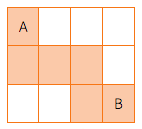
For example, take a look at the map in Figure 1.2. If you want to build a program to take a robot from point A along the orange path to point B, what are the inputs, output, and sub-processes that you would need to accomplish the goal? Remember the robot can only understand one very simple command at a time.
The inputs are a series of directions (down, right, right, right, down, right). The output is the robot being on position B. The sub-processes are six moves each with a direction as input.
Another example a person is running on a treadmill that tells her that she is traveling at 7.2 miles per hour. She knows that athletes often compare their minutes per mile and she wants to compare her speed to theirs.
The input is 7.2 miles an hour. The output is the number of minutes it takes her to run one mile. The sub-processes are 1) convert miles per hour to minutes per mile, 2) convert the decimal to seconds, and 3) combine the minutes with the seconds.
60 minutes / 7.2 miles = 8.333 minutes per mile
0.333 * 60 seconds = 20 seconds
8 minutes and 20 seconds / mile
What are functions?
Just as variables are the way computer programs store facts, functions are the way computer programs store processes. A function represents the things that computer needs to do to transform the inputs to an output. Functions are named based of what they accomplish with words often separated by an underscore. For example, in the conversion from miles per hour to minutes per mile example, there is one process and three sub-processes. Each process and sub-process needs a function. We name them according to what they do. Such as:
convert_miles_per_hour_to_minutes_per_mile
convert_miles_and_minutes_to_minutes_per_mile
convert_decimal_minutes_to_seconds
combine_minutes_and_seconds
Each of these functions will contain programming code necessary to perform each of the calculations with the first function using—often referred to as ‘calling’—the other three functions when they are needed. Therefore, functions can be nested inside each other like Matryoshka dolls.

Practice
- To automate a process
- To advance mathematics
- To communicate to another human an algorithm
- To create a series of steps to perform a task
old_variable = 5- An equation multiplying months to the input.
- A number of years.
- A number of months.
- A sentence stating how old the person is.
- A process
- An input
- An output
- Multiple inputs
Citations
Answers to practice problems
- B
- subtracted = -16
- output = 'Hello World!'
- new_variable = old_variable
- C
- A